
Building an Agentic Personal Trainer - Part 8: Testing and Debugging Agents
Building an Agentic Personal Trainer - Part 8: Testing and Debugging Agents
This is Part 8 of a series on building an agentic personal trainer. Read Part 1 for architecture, Part 2 for tools, Part 3 for the system prompt, Part 4 for Garmin integration, Part 5 for duplicate detection, Part 6 for memory, and Part 7 for LLM provider abstraction.
How do you test an AI agent? Unit tests don't cover "it gave bad advice." Verbose mode became my best debugging tool—watching the agent think out loud.
LangChain's verbose: true flag transforms debugging. Instead of black-box responses, you see every reasoning step (trainer-agent.js:79-83):
const agent = await initializeAgentExecutorWithOptions(tools, llm, {
  agentType: "chat-conversational-react-description",
  memory,
  verbose: true,  // Set to true for debugging, false for clean output
});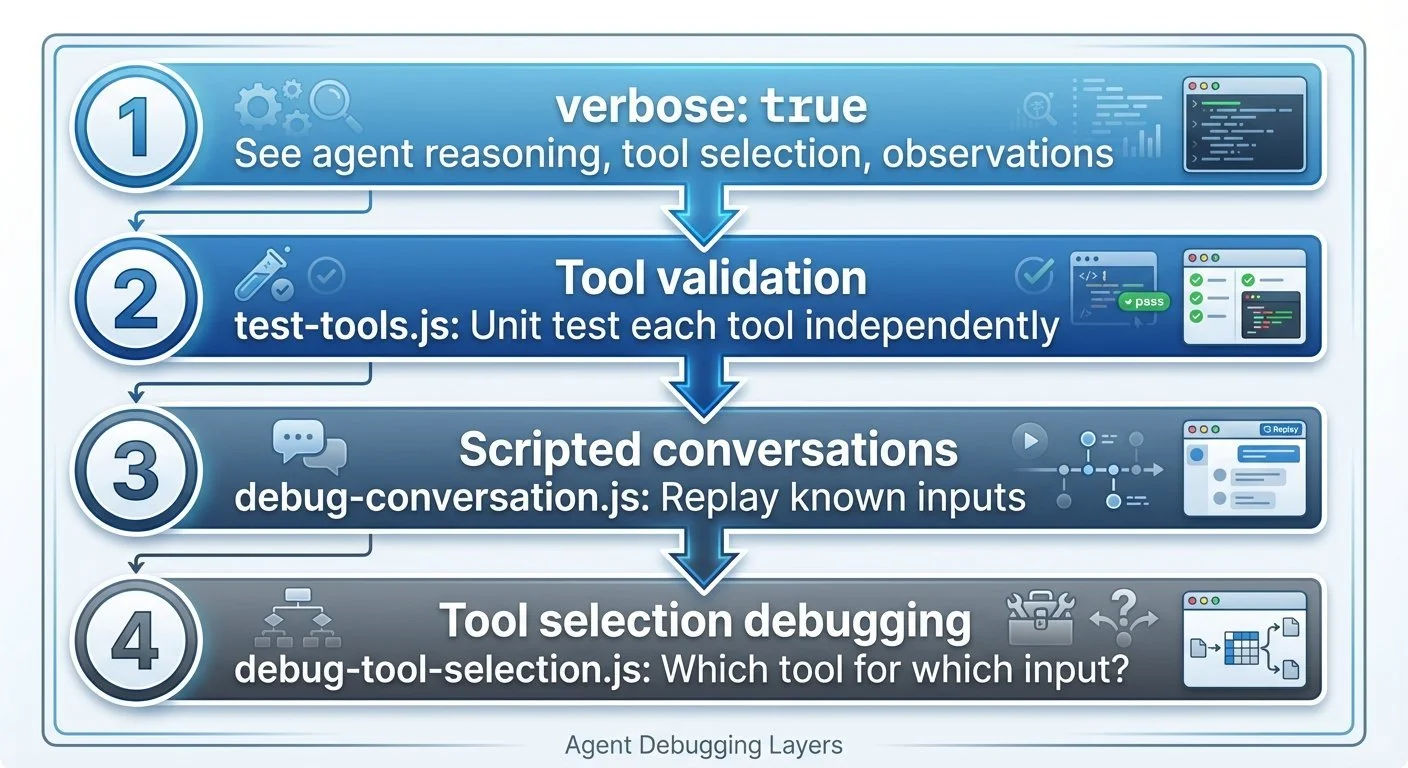
Agent debugging layers: Four layers of agent debugging: verbose mode, tool validation, scripted conversations, and tool selection analysis
With verbose mode on, I can see exactly why the agent picked a tool:
Agent: I should check for injuries before suggesting a workout.
Action: get_active_injuries
Observation: Active injuries: Left knee (moderate): Affects run, hike
Agent: Given the knee injury, I'll suggest low-impact options...
Tool validation came next with test-tools.js (scripts/test-tools.js) to test each tool in isolation. LangChain tools use .invoke(), not .func():
async function runTest(name, tool, input, validator) {
  const result = await tool.invoke(input);
  const testPassed = validator(result);
  console.log(testPassed ? `✅ ${name}` : `❌ ${name}`);
}

// Example: Test workout suggestion tool
await runTest(
  'suggest_workout - returns recovery options when tired',
  suggestWorkoutTool,
  JSON.stringify({ feeling: 'tired', duration_minutes: 60 }),
  (result) => result.includes('Workout suggestions:')
);
But unit tests only validate tools in isolation. The hardest bugs aren't crashes—they're the agent making reasonable-sounding but wrong decisions. "Suggest a hard interval workout" when the athlete just logged a race yesterday.
Testing agent behavior requires scripted conversations using LangChain's BaseCallbackHandler to track which tools get called (scripts/debug-conversation.js):
class ToolCallTracker extends BaseCallbackHandler {
  name = "tool_call_tracker";
  toolCalls = [];

  handleToolStart(tool, input) {
    this.toolCalls.push({ tool: tool.name, input });
  }
}

const scenarios = [
  { name: "Injury awareness",
    input: "Do I have any injuries I should know about?",
    expectTools: ["get_active_injuries"] },
  { name: "Workout suggestion request",
    input: "I have 2 hours and feel great, what should I do?",
    expectTools: ["suggest_workout"] }
];
Building this infrastructure uncovered the first bug: the tools were initially defined using LangChain's Tool class, but kept failing with cryptic errors. The fix: switch to DynamicTool with string coercion (trainer-agent.js:14-24):
function wrapToolWithStringCoercion(tool) {
  return new DynamicTool({
    name: tool.name,
    description: tool.description,
    func: async (input) => {
      const stringInput = typeof input === 'string' ? input : JSON.stringify(input);
      return tool.invoke(stringInput);
    }
  });
}
Local LLMs sometimes send numbers instead of strings. Without this test-driven discovery, it would have been a confusing runtime error.
Next, running the scripted tests revealed a second bug: all 6 scenarios failed with "Tools called: none"—even though the agent was clearly answering correctly using tool data. The callback handler wasn't being registered with the agent executor. After fixing the callback registration, all tests passed:
✅ PASSED: Correctly called get_active_injuries
✅ PASSED: Correctly called get_recent_workouts
✅ PASSED: Correctly called suggest_workout
✅ PASSED: Correctly called get_planned_schedule
✅ PASSED: Correctly called add_planned_workout
✅ PASSED: Called relevant tool: suggest_brick_workout

Test Summary: Passed: 6, Failed: 0, Total: 6
The fourth debugging layer is debug-tool-selection.js (scripts/debug-tool-selection.js) for ad-hoc investigation of specific prompts. It shows exactly what the LLM sees, what it decides, and why:
Prompt: "I have 2 hours and feel great, what should I do?"

🤖 LLM Response:
{
  "action": "suggest_workout",
  "action_input": "{\"feeling\": \"great\", \"duration_minutes\": 120}"
}

🔧 Tool Selected: suggest_workout
   Tool Input: {"feeling": "great", "duration_minutes": 120}
   Output: Workout suggestions:
   1. Based on your criteria, I suggest checking with the athlete
      about their preferences.

Final Response: Based on your feeling great and having 2 hours,
I suggest checking with you about your workout preferences to give
a more tailored suggestion.
The tool traces the full reasoning chain: LLM request → tool selection → tool output → final answer. Essential for debugging "why didn't it use the tool I expected?"
Agent debugging is fundamentally different from traditional debugging. You're not looking for crashes—you're looking for bad judgment. The agent that confidently gives terrible advice is harder to catch than the one that throws an error.
Verbose mode should be on during all development. The performance cost is worth it. When something goes wrong, you need to see the reasoning chain, not just the output.
Next: lessons learned from building this whole system.
Part 8 of 9 in the Agentic Personal Trainer series.
agentic-personal-trainer - View on GitHub
This post is part of my daily AI journey blog at Mosaic Mesh AI. Building in public, learning in public, sharing the messy middle of AI development.